
Where your voice goes: privacy and security in voice typing
How to read privacy claims about dictation: which parties receive audio and text, what encryption in transit does and doesn't protect, what stays on your device, and exactly how SayVelio routes your recordings.
In short
"Is my voice private?" has several answers, one for each party that touches it: your device, the speech recognition service, the cleanup service and the app maker. Encryption protects audio on the way, not what the receiver does with it. Ask who receives what, and who keeps it for how long. In SayVelio, audio goes straight from your device to the speech provider, text to the cleanup provider if cleanup is on, and our servers never receive either.
You said
note for later the client wants the contract by friday and the price is final
SayVelio typed
Note for later: the client wants the contract by Friday, and the price is final.
Ask about each step, not just "the app"
A dictation can pass through several places, and each one has its own rules:
- Capture on your device.
- Recognition, on the device or at a speech recognition service.
- Cleanup, if it's on, usually at a language model service.
- History of recent dictations, on the device, on a server, or both.
- Account data: email, settings, dictionary, usage statistics.
"We don't store your audio" can be perfectly true for one of these parties and say nothing about the others. A real privacy assessment names every party that receives audio or text, what it keeps and for how long.
What encryption in transit does
Connections to speech services use TLS, the same protection as any HTTPS website. The current version, TLS 1.3, does three things on each connection:
- Confidentiality: people on the network (the café Wi-Fi, your internet provider) can't listen in.
- Integrity: nobody can alter the audio or text on the way without it being detected. TLS 1.3 uses authenticated encryption (AEAD), which rejects data that was tampered with rather than decrypting it into garbage.
- Authentication: your device checks that it's really talking to the service it meant to reach.
What encryption doesn't do
Encryption protects the trip, not the destination. Once the audio arrives, the service you sent it to can decrypt and process it, because that's its job. Encryption says nothing about:
- whether the service keeps the audio or text, and for how long;
- who inside the service can access it;
- whether it's used to train models;
- whether the app should have sent it at all.
Those are covered by the provider's policies and contracts, not by the padlock in the address bar. "Uses HTTPS" is a good sign about transport, and nothing more. Be skeptical of promises like "perfect privacy" or "zero data exposure" based only on encryption.
How SayVelio routes your dictation
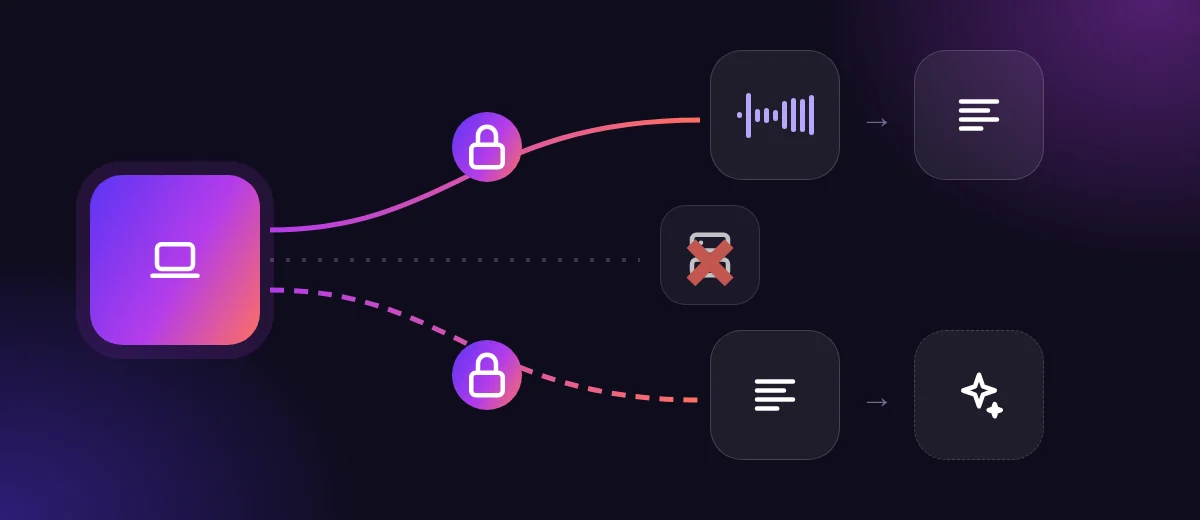
- Audio goes directly from your device to the speech recognition provider.
- With cleanup on, the transcript goes to the language model provider, together with your cleanup prompt, your dictionary and the style for the app you're typing in.
- Our servers never receive your recordings, transcripts or cleaned text from the apps.
- The providers process requests under their own terms and privacy policies, for whoever owns the API key: you, your team, or us when you use our key. Which providers are involved is listed in our Privacy Policy.
- Training: we don't train AI on your data.
What stays on your device
- Text history: your recent dictations (up to 500) stay on your device so you can review and copy them.
- Audio: the Mac and Windows apps keep the audio of only the most recent dictations (30 by default); the iPhone and Android apps keep no audio. You can clear history at any time.
- Offline model: on Mac, Windows, iPhone and Android you can download an optional speech model to the device. Dictations recognized by it don't leave the device at all (and skip cleanup).
What our servers do keep is what an account needs: your email, settings, dictionary, snippets, your cleanup prompt and app styles, and daily counts such as how many dictations and words you made, without their content.
A checklist for any dictation tool
- Which companies receive my audio? My text?
- Does anyone keep them, and for how long?
- Are they used for training, and can I opt out?
- Whose API key is used, and whose contract applies?
- Can I dictate fully offline when I need to?
- Can I see and delete my history?
Questions
If an app says it doesn't store audio, is my dictation private?
Read that narrowly. The app maker may not store it, while the speech service that processed it has its own retention rules, and local history may keep it on your device. The full answer is who receives what, who stores it, and what you can control.
Is dictation safe for confidential work?
It depends on your rules. For sensitive material, use the offline model so nothing leaves the device, or use your company's own provider key so its contract applies. Teams can set this up in the SayVelio account.
Related reading
 How voice typing works
What voice typing is: the path from your voice to text on screen
Voice typing, transcription and voice control are three different things. Here is what dictation actually does, the stages between microphone and cursor, and where each of them can run.
MacWindowsiPhoneAndroid How voice typing works
How speech recognition learns, and why context helps with names and jargon
Training vs everyday use, why models struggle with unfamiliar names and accents, how context hints and dictionaries steer recognition, and why dictating doesn't mean your voice trains the model.
MacWindowsiPhoneAndroid Features
Custom dictionary: teach dictation your names, brands and jargon
What to add to your SayVelio dictionary and what to leave out, how to fix a word that keeps coming out wrong, and why a short dictionary beats a long one.
MacWindowsiPhoneAndroid